Editing the hosts file on macOS
Editing the hosts file on macOS
July 23, 2021
Note
This post may be partially machine- or AI-translated. If there is any discrepancy, the Korean version takes precedence.
Note
This post might be outdated and some links might not be available.
This is how to edit the hosts file on macOS.
This was written on macOS 11.4 (20F71).
Run a terminal command
Edit it with the nano editor.
Enter the following command in Terminal.
% sudo nano /private/etc/hostsAt the password prompt, enter your macOS user password.
(The password is not shown on screen, so type it and press Enter.)
buffashe@buffashe-MacBook-Pro ~ % sudo nano /private/etc/hosts
Password:
Add or remove the entries you want.
Separate the IP address and hostname with a tab.
Do not edit the section marked with the red border.
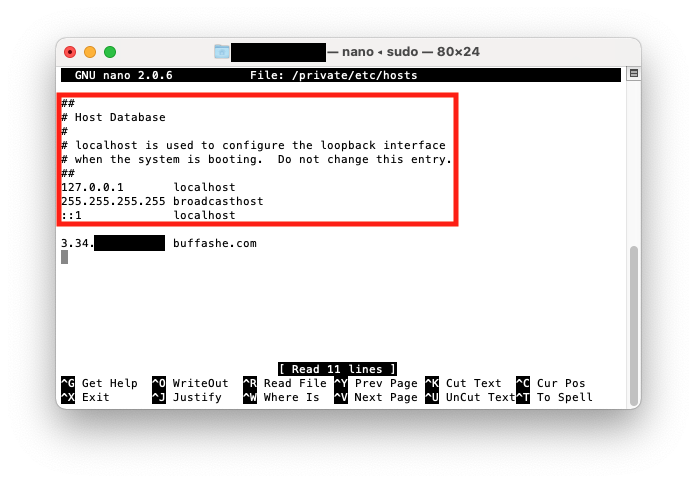
Save with Ctrl+X (Exit) - Y (Save modified buffer) - Enter (File Name to Write).
Original hosts file
This is the contents of /private/etc/hosts on macOS 11.4 (20F71).
/private/etc/hosts
##
# Host Database
#
# localhost is used to configure the loopback interface
# when the system is booting.  Do not change this entry.
##
127.0.0.1       localhost
255.255.255.255 broadcasthost
::1             localhost
Reference
Last updated on