Changing the timezone on Ubuntu
Changing the timezone on Ubuntu
February 6, 2020
Note
This post may be partially machine- or AI-translated. If there is any discrepancy, the Korean version takes precedence.
This guide was written on Ubuntu 18.04.4 LTS.
You can check the currently configured timezone with the timedatectl command.
buffashe@buffashe-vm:~$ timedatectl
                      Local time: Thu 2020-02-06 04:46:15 UTC
                  Universal time: Thu 2020-02-06 04:46:15 UTC
                        RTC time: Thu 2020-02-06 04:46:17
                       Time zone: Etc/UTC (UTC, +0000)
       System clock synchronized: yes
systemd-timesyncd.service active: yes
                 RTC in local TZ: no
It is currently set to Etc/UTC.
Method 1: Use dpkg-reconfigure
$ sudo dpkg-reconfigure tzdata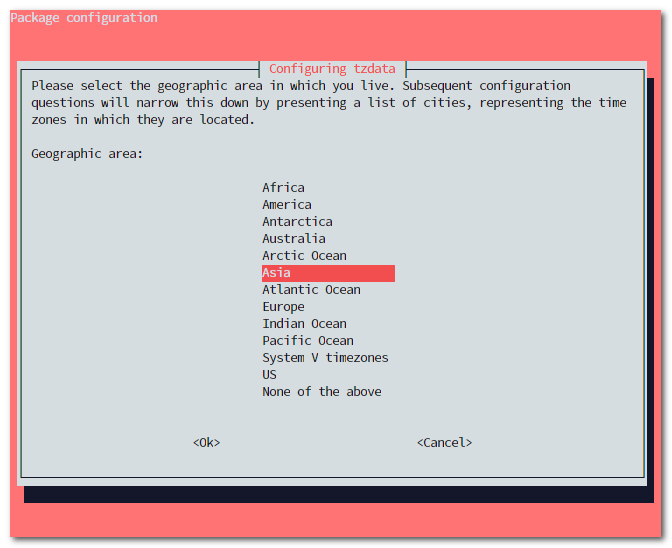
Use the arrow keys to find the region you want, then press Enter.
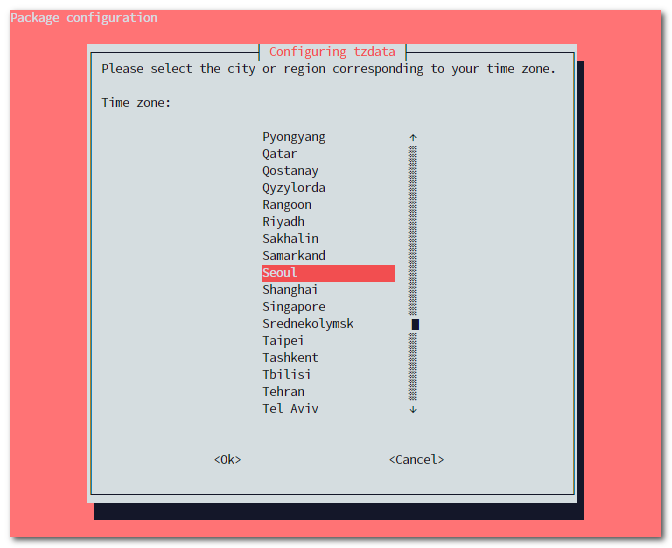
Find the timezone you want to change to and press Enter to finish.
buffashe@buffashe-vm:~$ sudo dpkg-reconfigure tzdata

Current default time zone: 'Asia/Seoul'
Local time is now:      Thu Feb  6 13:56:11 KST 2020.
Universal Time is now:  Thu Feb  6 04:56:11 UTC 2020.
Method 2: Use timedatectl
Search for the timezone you want.
$ timedatectl list-timezones

$ timedatectl list-timezones | grep Seoul
Asia/Seoul
Change the timezone.
$ sudo timedatectl set-timezone Asia/SeoulYou can confirm that it changed.
buffashe@buffashe-vm:~$ timedatectl
                      Local time: Thu 2020-02-06 14:00:59 KST
                  Universal time: Thu 2020-02-06 05:00:59 UTC
                        RTC time: Thu 2020-02-06 05:01:01
                       Time zone: Asia/Seoul (KST, +0900)
       System clock synchronized: yes
systemd-timesyncd.service active: yes
                 RTC in local TZ: no
Last updated on